
Completion and navigation
The console’s editor completes names, functions and your own snippets as you type, and jumps from a name to where it is defined. Completion runs in the engine against a cache of the catalog.
Completion
Section titled “Completion”Complete a name
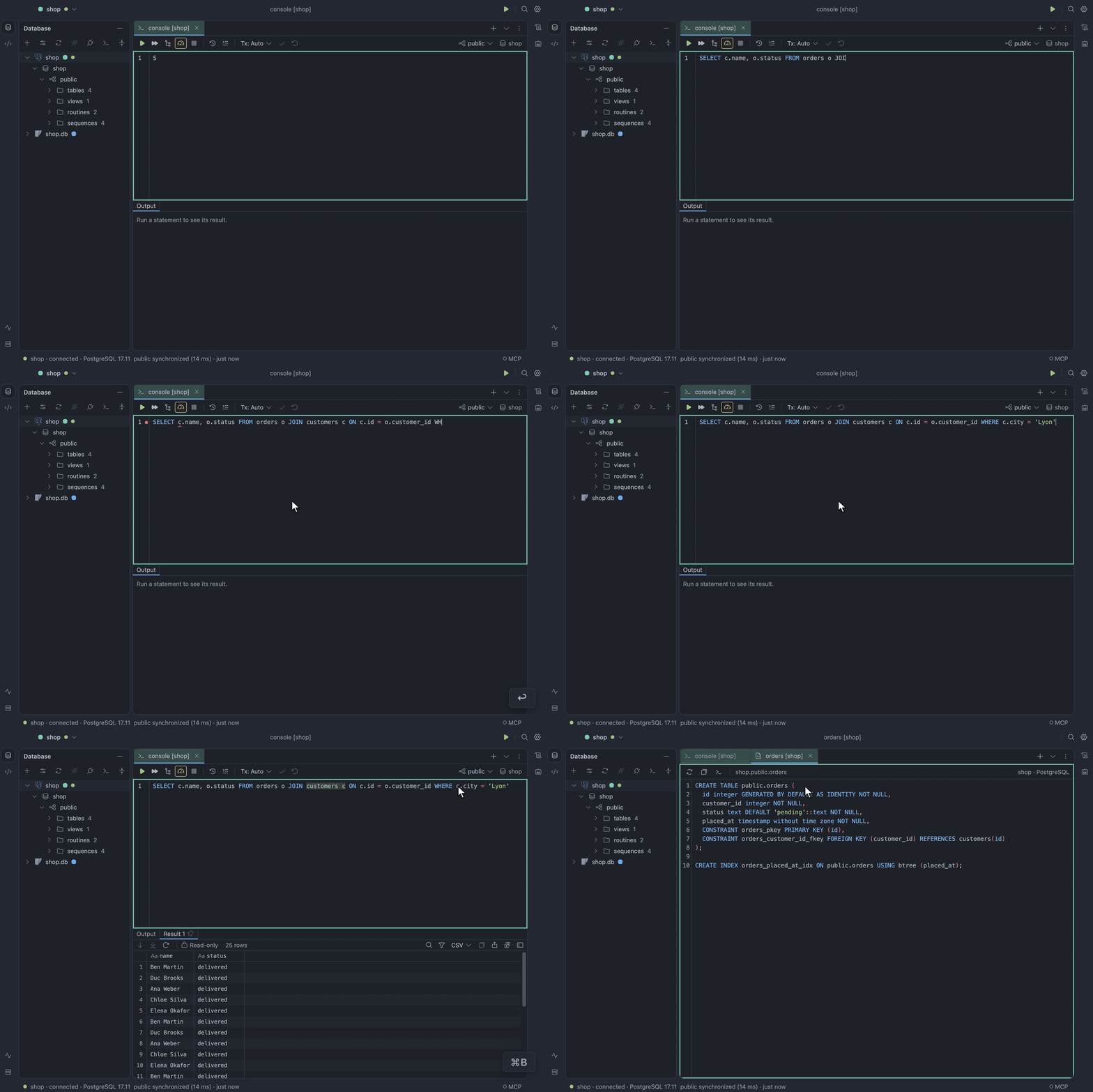
Section titled “Complete a name”Press ⌃Space to open completion anywhere. What it offers follows the caret:
- After
FROM, relations. - After
JOIN, whole join conditions that follow foreign keys, such ascustomers c ON c.id = o.customer_id. - After
c., the columns of that alias.
Enter inserts the selected option and keeps the rest of the word after the caret. Tab replaces
the whole word, as in DataGrip.
Call a function
Section titled “Call a function”In an expression, completion offers the server’s built-in functions with their parameters, return
type and a line on what each does. MySQL and TiDB get the full list for the server’s version, so
MySQL 8.4 never offers PASSWORD and TiDB offers its own TIDB_* functions.
Accepting a function leaves the caret inside (). A hint above the call shows every overload, with
the parameter at the caret in bold. Choose Parameter Info or press ⌘P to bring the hint back,
and press Escape to hide it.
Work in another database or schema
Section titled “Work in another database or schema”Completion follows USE and SET search_path. Once one runs, the console’s toolbar shows the
database or schema it is in, and unqualified names complete there. In a script, a USE above the
caret counts even before it runs. After USE , SET search_path TO or SET SCHEMA , completion
offers the databases or schemas themselves.
To switch the console to another database or schema, click the one shown in the toolbar and pick
another. TableCraft runs the USE or SET search_path for you.
Navigation
Section titled “Navigation”Go to a declaration
Section titled “Go to a declaration”Choose Go to Declaration or press ⌘B. On an alias it moves the caret to where the alias is
defined, and on a table it opens the table’s DDL.
See Completion and navigation.
Snippets
Section titled “Snippets”A snippet is a template you insert from completion by typing its prefix. The list starts empty. The Snippets dialog is where you create, search, edit, preview and delete your templates.
Create a snippet
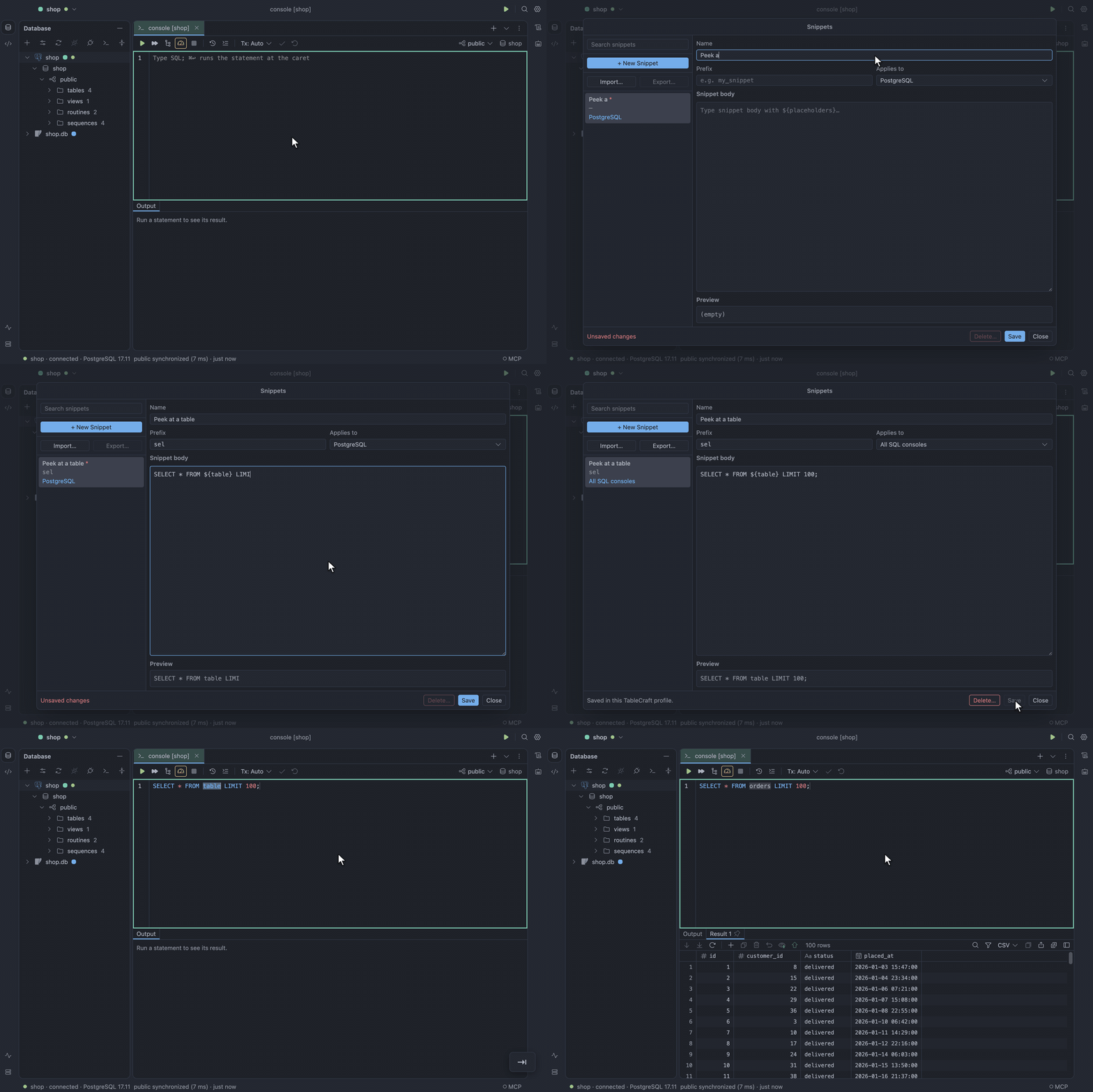
Section titled “Create a snippet”- Open Find Action and choose Snippets….
- Click + New Snippet.
- Fill in Name, Prefix (the completion prefix) and Snippet body.
- Under Applies to, choose where the snippet works.
- Click Save.
The snippet now shows in completion when you type its prefix in a matching console.
Applies to chooses All text consoles, All SQL consoles, or one installed data source type, and a new snippet defaults to the active data source’s type, or All text consoles when none is active. A type-specific snippet applies to every data source using that plugin, not only one connection. The types listed come from installed plugins’ names and identities, not from syntax-highlighting dialects.
For example, save prefix sel for All SQL consoles with this body:
SELECT * FROM ${table} LIMIT 100;For a Redis-scoped snippet, prefix getkey could insert:
GET ${key}${cursor}Insert a snippet
Section titled “Insert a snippet”- In a matching SQL or command console, type the snippet’s prefix. The snippet appears alongside the console’s usual suggestions.
- Accept it with
TaborEnter. - Fill in the fields, moving between them with
TabandShift+Tab. - Run the SQL or command as usual.
Inserting a snippet never runs it. Editing templates and expanding them need no live database connection.
Fields work this way:
${table},${schema},${key}and any other named field are text you fill in. They are not values fetched from the database. Repeated names edit together.${cursor}marks the final caret position and inserts no text.
A command language without a recognized highlighter uses plain text, with no SQL keywords.
Find the snippets file
Section titled “Find the snippets file”Snippets are saved in snippets.json in your profile folder, separately from
settings. Their bodies are plain text, so keep passwords and other secrets out of them.
Older SQL-only snippets keep their SQL and dialect restrictions when loaded, and reading does not rewrite the file. The next successful create, update or delete saves the migrated version-2 document.
Command consoles, such as those of Redis, etcd and Apache Kafka, use snippets too, and so can any plugin that provides the SQL or command-console hooks.